
We Love the Artec Leo. Just not for Flanges.
Before I start, I want to be clear: we really do love the Leo. It’s a great scanner, one of our favorites. Don’t hate us, Artec. We love you and your product, but it’s just not the right one for flanges.
We figured we needed to write an article to specifically call out the Leo because of how widely it’s been adopted in the industrial service industry, and the temptation to use the tool you already have.
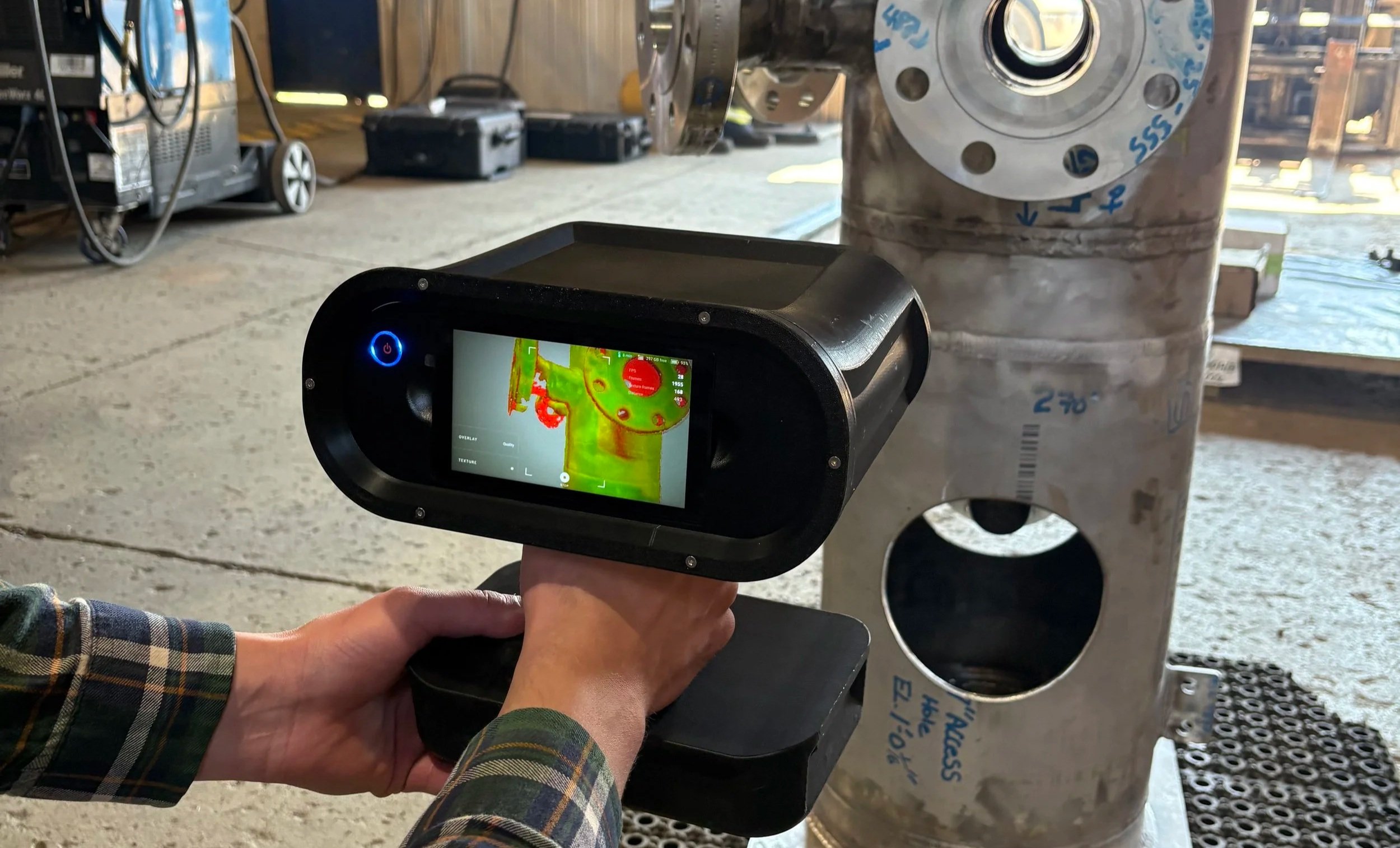
And it’s easy to see why it’s so popular. It’s a highly capable handheld 3D scanner. Its wireless operation, built-in screen, real-time processing, and large field of view make it a very useful field-deployable scanner. That’s why it’s one of the most common scanners you’ll find at industrial service companies, many of which also offer some form of flange inspection and machining.
Flange flatness inspection is a highly demanding measurement application because very small deviations across a relatively simple, repetitive surface can determine whether a flange passes or fails an inspection. Leo is good, but as you will read, it’s just not good enough. When the inspection is being evaluated against ASME PCC-1, the accuracy, resolution, tracking method, and processing workflow are all very important.
For the reasons below, we don’t recommend the Artec Leo for flange inspection. Read on.
Understanding What ASME PCC-1 Is Measuring
ASME PCC-1 provides guidance for pressure-boundary bolted flange joint assembly. Its flange inspection provisions include measurements of the gasket seating surface in both the circumferential and radial directions.
For the 2022 edition, the published flange seating face flatness tolerances include:
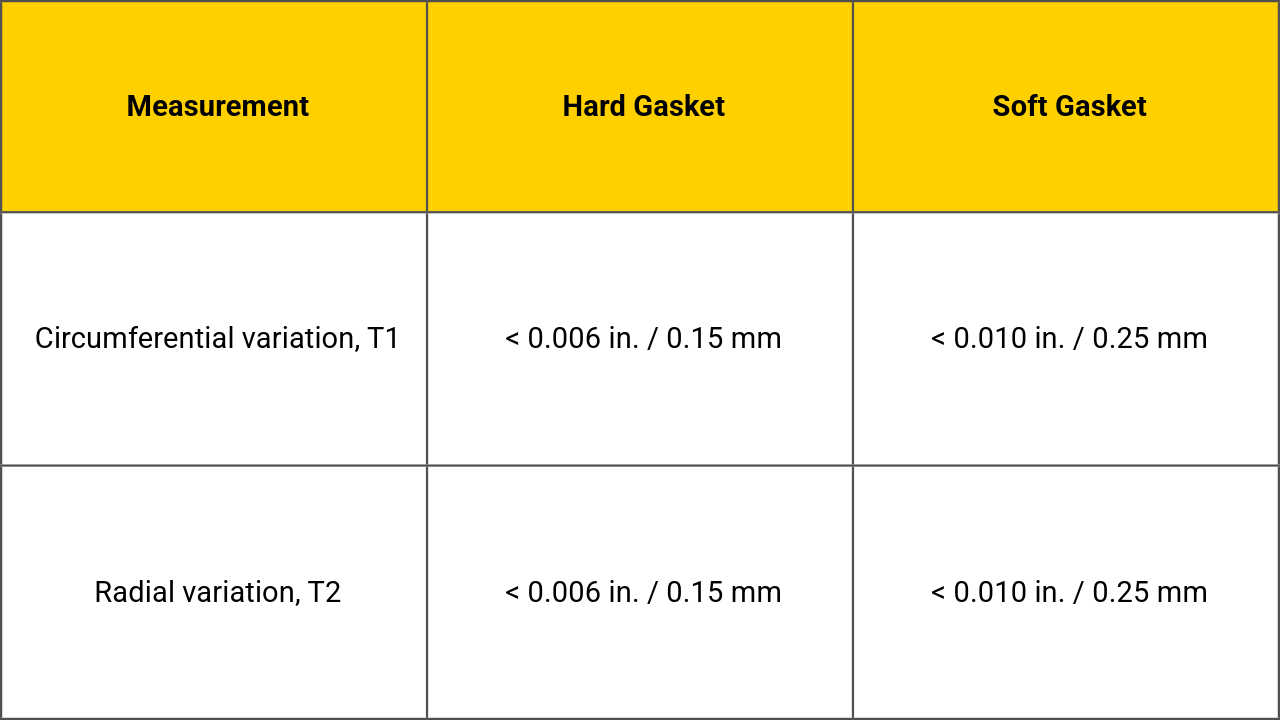
ASME describes T1 as variation around circumferential measurement paths across the gasket seating surface. T2 evaluates variation along radial paths across that surface.
This is important because 0.15 mm is a very small tolerance. That’s about the thickness of one or two sheets of office paper.
The measurement system therefore needs to reliably distinguish between a flange that is within the allowable variation and one that is outside it.
1. The Leo’s Accuracy Is Too Close to the PCC-1 Acceptance Limit
According to Artec’s published specifications, the Leo provides:
3D point accuracy: up to 0.1 mm
3D accuracy over distance: up to 0.1 mm + 0.3 mm/m
Comparing the scanner’s 0.1 mm point-accuracy specification with PCC-1’s 0.15 mm hard-gasket flatness limit, the difference is only 0.05 mm. That doesn’t leave much margin.
For example, imagine this scenario:
· Leo measures a flange’s variation at 0.14 mm
· PCC-1 says you are allowed up to 0.15 mm, so we are good, right?
· Leo’s stated accuracy = ±0.1 mm (we will ignore accuracy over distance for now)
· The actual flange variation could then be as high as 0.24 mm (0.14 + 0.1) or as low as 0.04 mm (0.14 – 0.1)
· 0.24 mm is a major fail, and could result in leakage
· 0.04 mm is a major pass, no need to machine that bad boy
Your job hinges on making informed decisions and getting that bolted joint back into service leak-free. How are you supposed to decide if this flange is good or bad when the real answer could be anywhere between 0.04 mm and 0.24 mm?
Answer: you’re not. You’re guessing.
And that’s before accuracy over distance. Leo’s spec is 0.1 mm + 0.3 mm/m. Across a 24" gasket face (about 0.6 m), that works out to roughly 0.28 mm, which is almost double the PCC-1 hard gasket limit. The bigger the flange, the worse it gets.
This does not mean that every Leo measurement will contain a 0.1 mm error. Scanner accuracy specifications do not work that way. But you could have that error and have no way of knowing, which is sketchy.
2. Resolution Uncertainty Creates Another Concern
Accuracy and resolution are different. Accuracy describes how closely a measurement represents the true location of a point. Resolution describes the scanner’s ability to distinguish small geometric details.
The Leo’s published 3D resolution is up to 0.2 mm. That is 100% fine for flatness measurements, as you don’t need super high resolution to get the flange profile. For example, we commonly scan flanges at a resolution of 1.5 mm, and if we need to capture defects or sharp edges, we go down to 0.8 mm. Both of those are well within the Leo’s capability.
Where resolution gets tricky with Leo is that you don’t really control it up front. You pick a resolution when you fuse the data in Artec Studio, but how much detail you actually captured depends on your scanning distance, speed, and angle. So you don’t really know what you’ve got until after you have completed the workflow and meshed the file. Other scanners let you set the scanning resolution before you start, which is better for consistency.
3. A Flange Is a Difficult Shape to Track
This section is a bit technical and requires a bit of knowledge on how a Leo gathers 3D data. Bear with me.
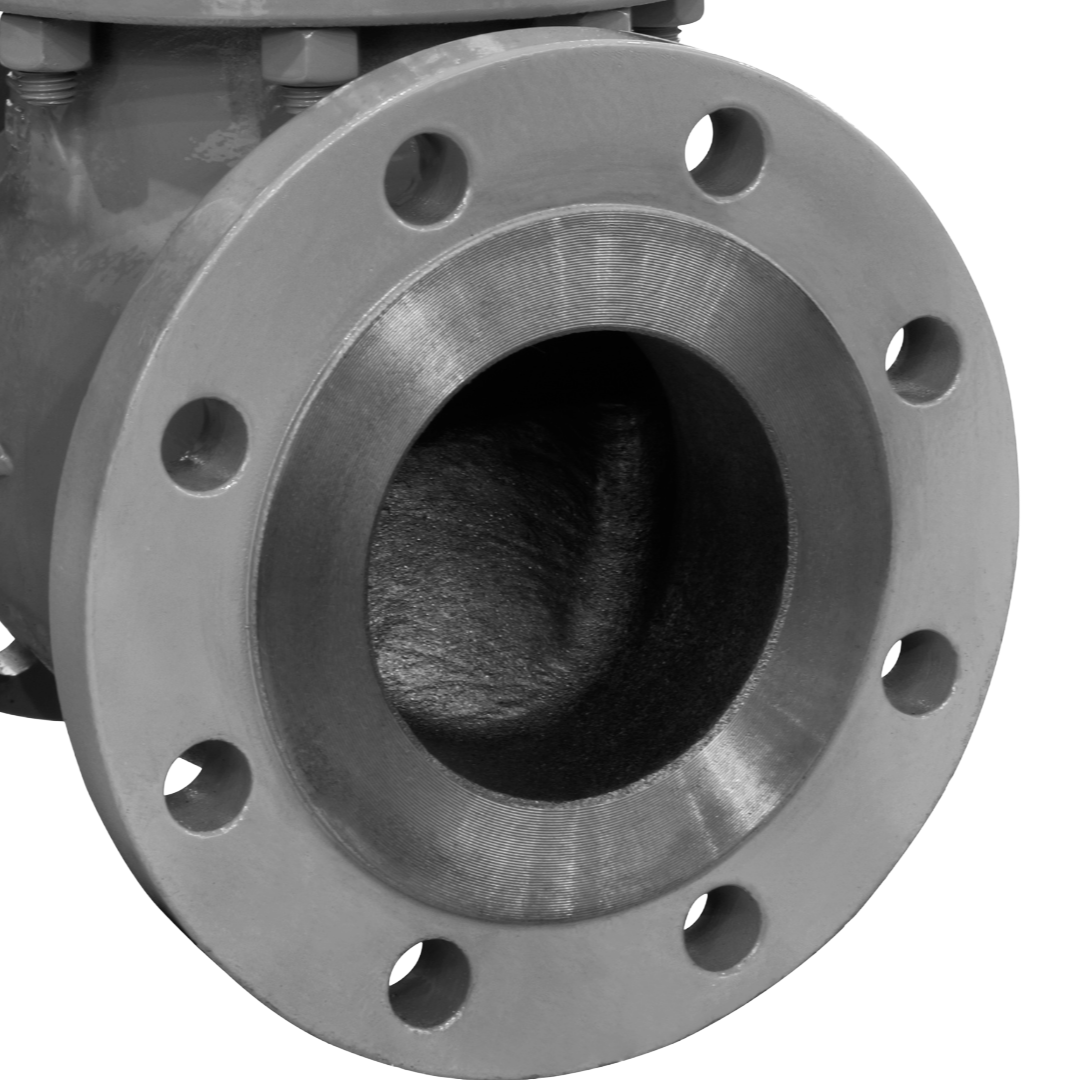
A typical flange face consists largely of flat surfaces, circular edges, repeating bolt holes, symmetrical geometry, and relatively few unique geometric features.
Leo uses hybrid geometry and texture tracking, meaning it uses distinct geometric features on the object, or changes in color, to track where it is.
Artec recommends that objects and their surroundings contain sufficient unique features when maximum accuracy is required. Lots of distinct geometry.
Artec also warns that featureless or glossy surfaces can negatively affect registration. Flanges by default are relatively featureless, uniform in color / texture, and can be glossy depending on the material.
This matters when scanning a flange.
Imagine walking around a large circular flange with the scanner. One section of the flange can look remarkably similar, if not identical, to another section. So practically, you can be scanning and the scanner loses track of where it is because it thinks it’s looking at a section of the flange it already scanned. EVERYTHING LOOKS THE SAME!
The scanner must continuously determine: "Where am I relative to all of the frames I previously captured?"
On a complex object—such as a pump casing with numerous unique features—the geometry can provide strong references, but a machined flange face provides few unique references.
If tracking becomes unstable, small errors can accumulate as the operator moves around the flange.
All that is technical talk for: Leo struggles to scan flanges, so maximum accuracy is hard to achieve.
Also, for all you Leo nerds out there, yes, you can help this problem. You can add geometry or texture with painter’s tape and marker squiggles, use scanning spray, or add targets to assist tracking. But even with targets, Leo is still a hybrid tracking scanner. It isn’t designed around target-based tracking. You can technically make it work, but it’s hard to proceduralize and standardize a workflow that gives repeatable results.
4. Scanning Artifacts Can Look Like a Bad Flange
An overly simple way of describing how Leo works is that it takes a bunch of photos (not exactly, but close enough). Then the Artec Studio software figures out where every photo (frame) is supposed to go relative to the other ones. Then in Artec Studio you create your mesh file from that raw data and export it to do your flange inspection in FlangeVision.
That process is generally reliable, but it can mess up. We have seen it happen. Sometimes the frames are slightly out of place, and that creates artificial layers of 3D data (artifacts). This can be difficult to detect without a trained eye, and sometimes impossible to fully correct without re-scanning the object.
Because of this, I wouldn’t trust it as a general inspection tool. If the frames are even slightly off from reality, that can read as a flange failure when your flange may be perfectly fine. That wastes your client’s money and time by having them mount a machine on the flange, only to find out it’s actually flat. Not good.
It can also go the other way. Registration and processing can smooth over a real defect, so a bad flange reads as good. That one is worse. That’s the flange that goes back into service and leaks.
Ironically, this error is more likely to happen on flanges that are near perfect, because of what I mentioned in point 3 about needing changing geometry and texture to get good results. A perfect flange has very little of either.
5. Processing Can Change the Surface Being Inspected
Most people would agree that ketchup is no longer a tomato. That’s because it’s been heavily processed.
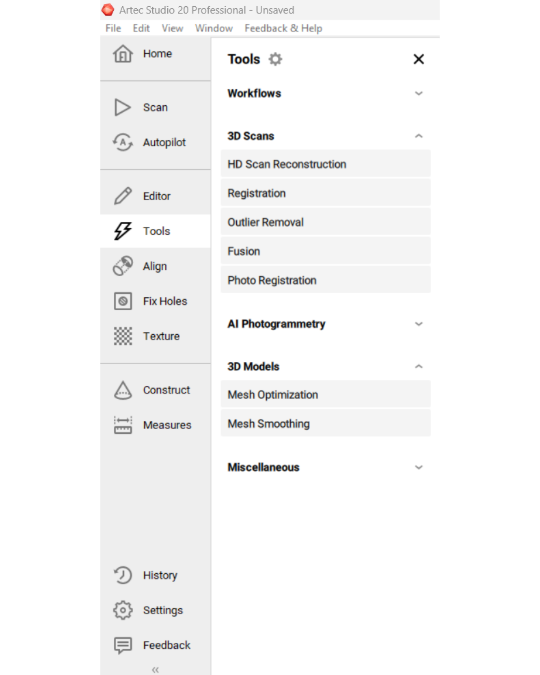
A Leo scan usually requires quite a bit of processing in Artec Studio before you get your final result. Artec’s recommended accuracy workflow can involve global registration, alignment, outlier removal, and mesh optimization.
These tools are great for making nice-looking 3D models. For inspection, though, they raise a question: How much has the final mesh been changed by the processing?
Consider a flange with a shallow 0.15–0.20 mm wave across its gasket seating surface. That wave is exactly what the inspection is trying to find. Aggressive noise removal, fusion, smoothing, simplification, or other processing could change how that small feature shows up in your final mesh, or erase it entirely.
Compare that to scanners that track on targets (scanning markers). Many of them can scan directly to a mesh, or you simply scan and then wrap the mesh file. There are fewer steps, and the markers make the results much more repeatable and reliable.
The more a scan is processed, the harder it is to tell if the processed results are actually real.
Is your 3D scan still a tomato, or is it ketchup?
The Bottom Line
Flange inspection requires a strict combination of accuracy, repeatability, and procedural ease.
The Artec Leo struggles because of:
1. Accuracy: 0.1 mm + 0.3 mm/m doesn’t leave enough margin against a 0.15 mm limit.
2. Resolution: 0.2 mm is good by spec, but you don’t control what you actually capture, so consistency is a challenge.
3. Tracking: Texture- and geometry-based tracking is not well suited for flanges. Tape, spray, and targets can help, but repeatability is an issue.
4. Scanning Artifacts: Leo can create artifacts (data that isn’t real, or is out of place), especially when scanning objects that are flat, shiny, and have minimal unique geometry. Artifacts can report a flange failure when you don’t have one, or hide one when you do.
5. Processing: Too much processing creates uncertainty. Is your data real? Did you turn your tomato into ketchup?
None of this means the Leo is a bad scanner. It means it’s the wrong tool for this job. For PCC-1 flange inspection, you want a scanner with much tighter accuracy, tracking you can repeat every time, and as few processing steps as possible.
We still love the Leo. Just not for flanges.
Tim Gaida, P.Eng.
President, My Engineering Ltd.