
Understanding a FlangeVision Flange Inspection Report
A flange inspection report can contain a lot of measurements, charts, and technical terms. For someone who does not perform flange inspections regularly, it may be difficult to know which numbers matter and what they actually tell you.
The FlangeVision report is designed to turn 3D scan data into an organized inspection record. It looks at the Gasket Sealing Surface (GSS)—the part of the flange where the gasket sits—and reports how flat that surface is in different directions. It can also document surface defects, surface finish, flange dimensions, and the inspection criteria used to determine whether the flange passes or fails according to the inspection tolerance.
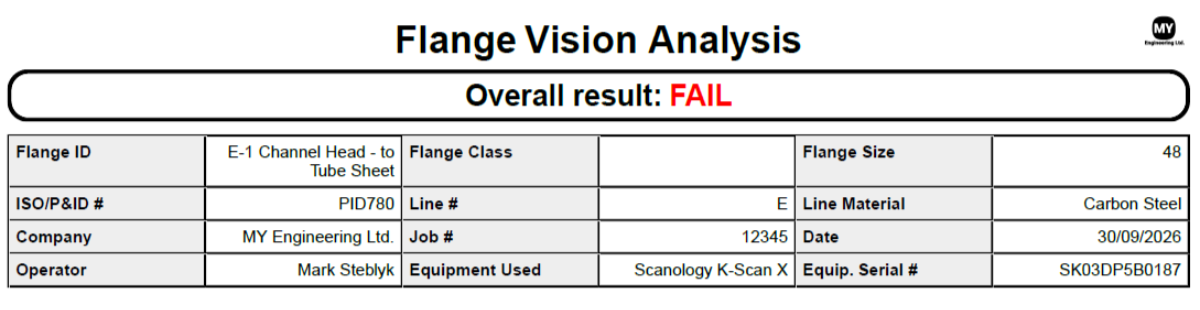
1. Overall Inspection Result
The first page provides the overall PASS/FAIL result of the inspection, and the specific flange identification and project information, such as the flange ID, flange class, flange size, ISO/P&ID number, line number, material, company, job number, operator, equipment used, and equipment serial number.
These fields help connect the inspection results to the correct flange and create a traceable record of the inspection.
2. Gasket Sealing Surface (GSS) Flatness Summary
The GSS – Flatness Summary provides the main measurements used to describe the condition of the actual gasket sealing surface.

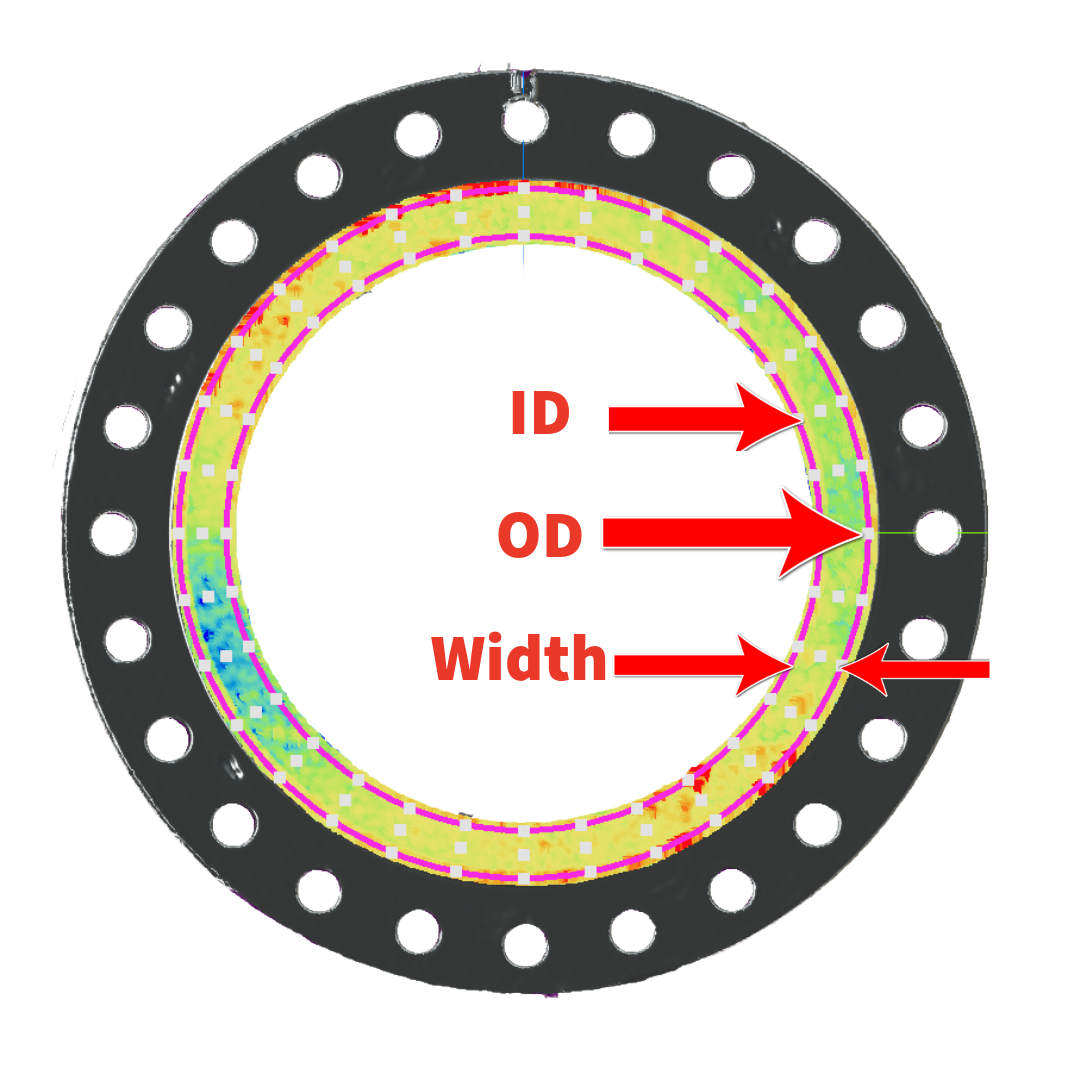
The GSS Flatness Summary first identifies the gasket sealing surface dimensions including the inside diameter, outside diameter and width that were used for measurement.
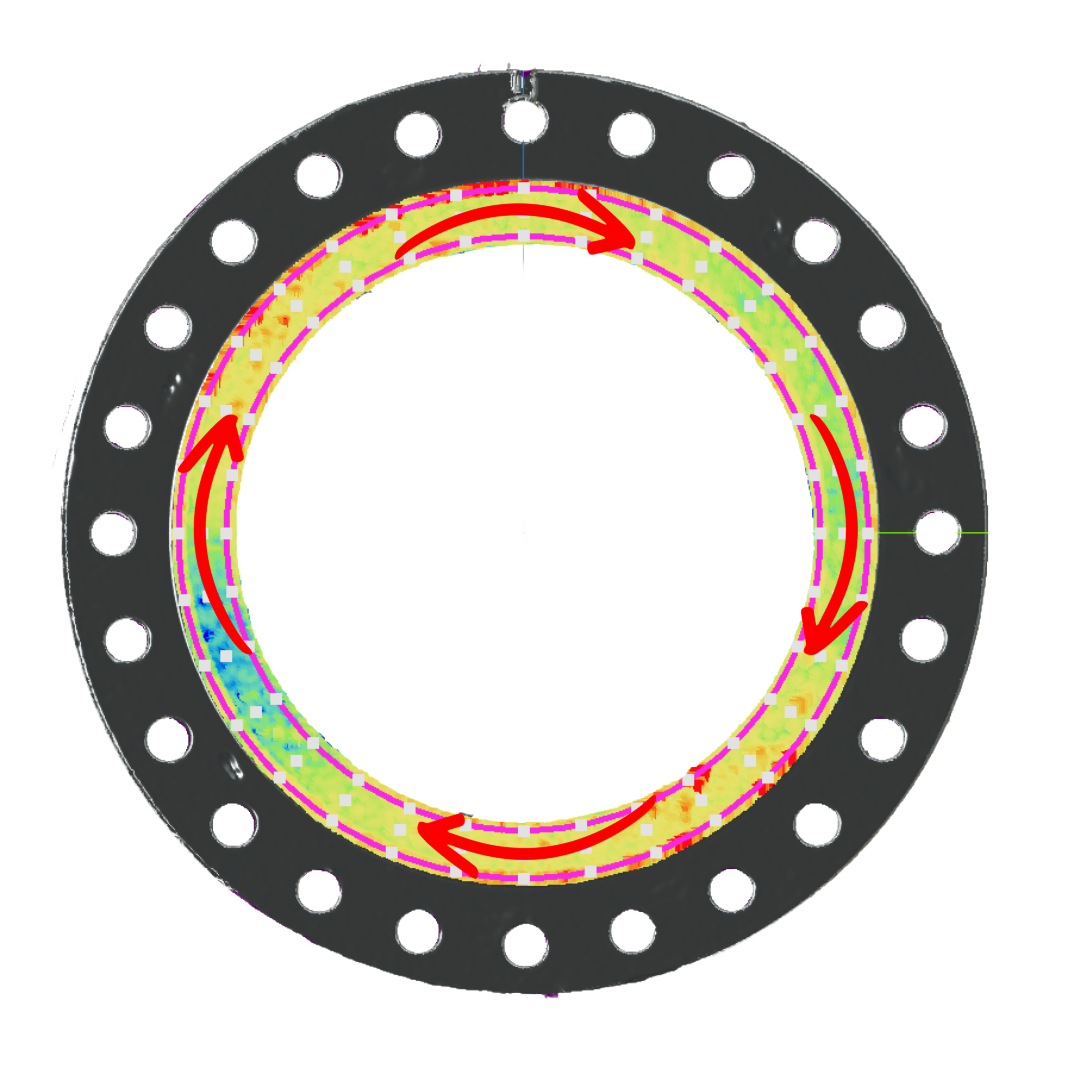
Maximum Circumferential Deviation: Think of circumferential flatness as checking the flange around the circle. FlangeVision examines circular paths at the ID, Mid and OD, around the gasket sealing surface and determines how much the surface rises and falls along those paths. The largest variation found becomes the maximum circumferential deviation reported on the first page.
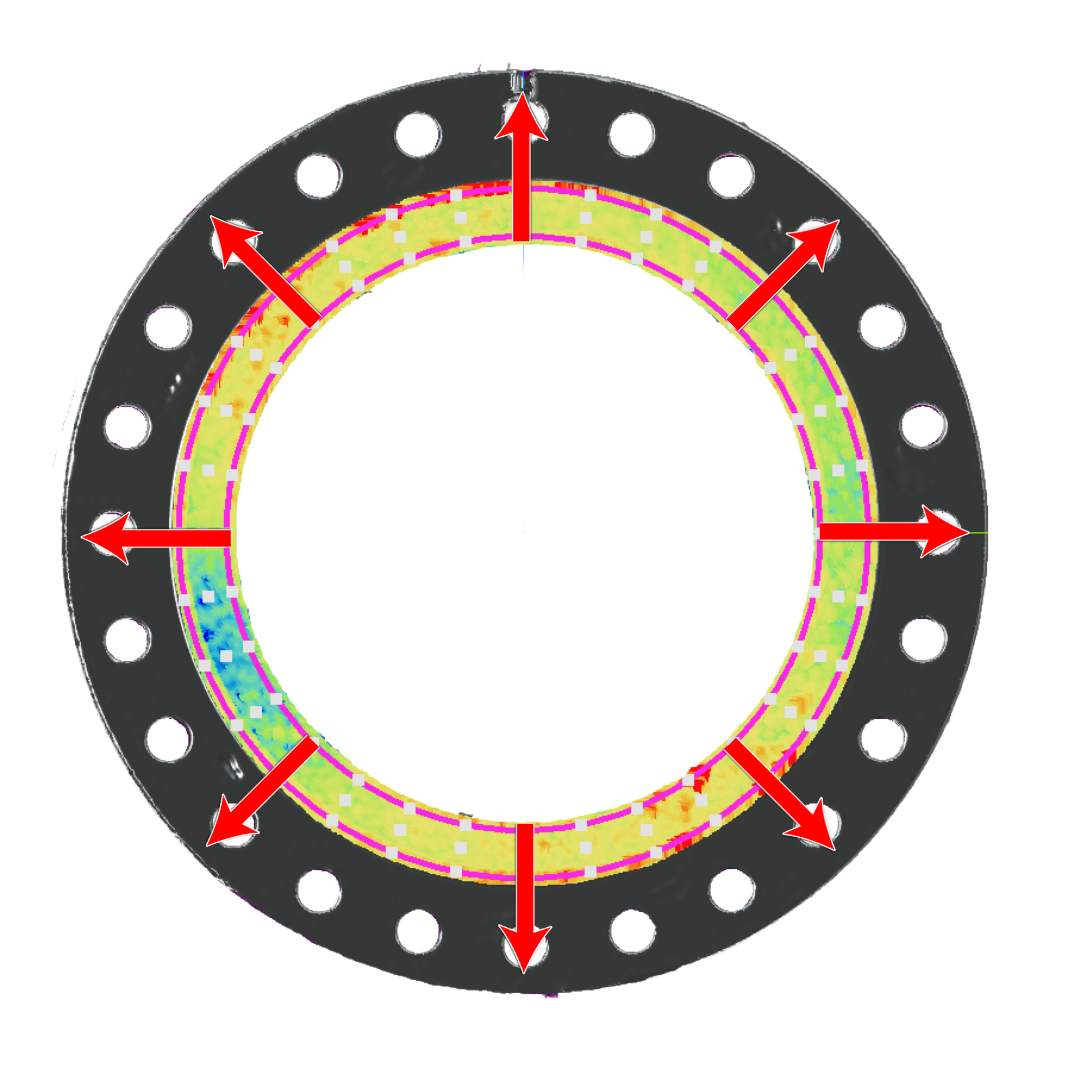
Maximum Radial Deviation: Instead of travelling around the flange, imagine drawing a line from the inside edge (ID) toward the outside edge (OD) of the gasket sealing surface. FlangeVision measures the height changes along these radial paths and reports the largest radial variation in this summary section.
3. Flange Thickness Measurements
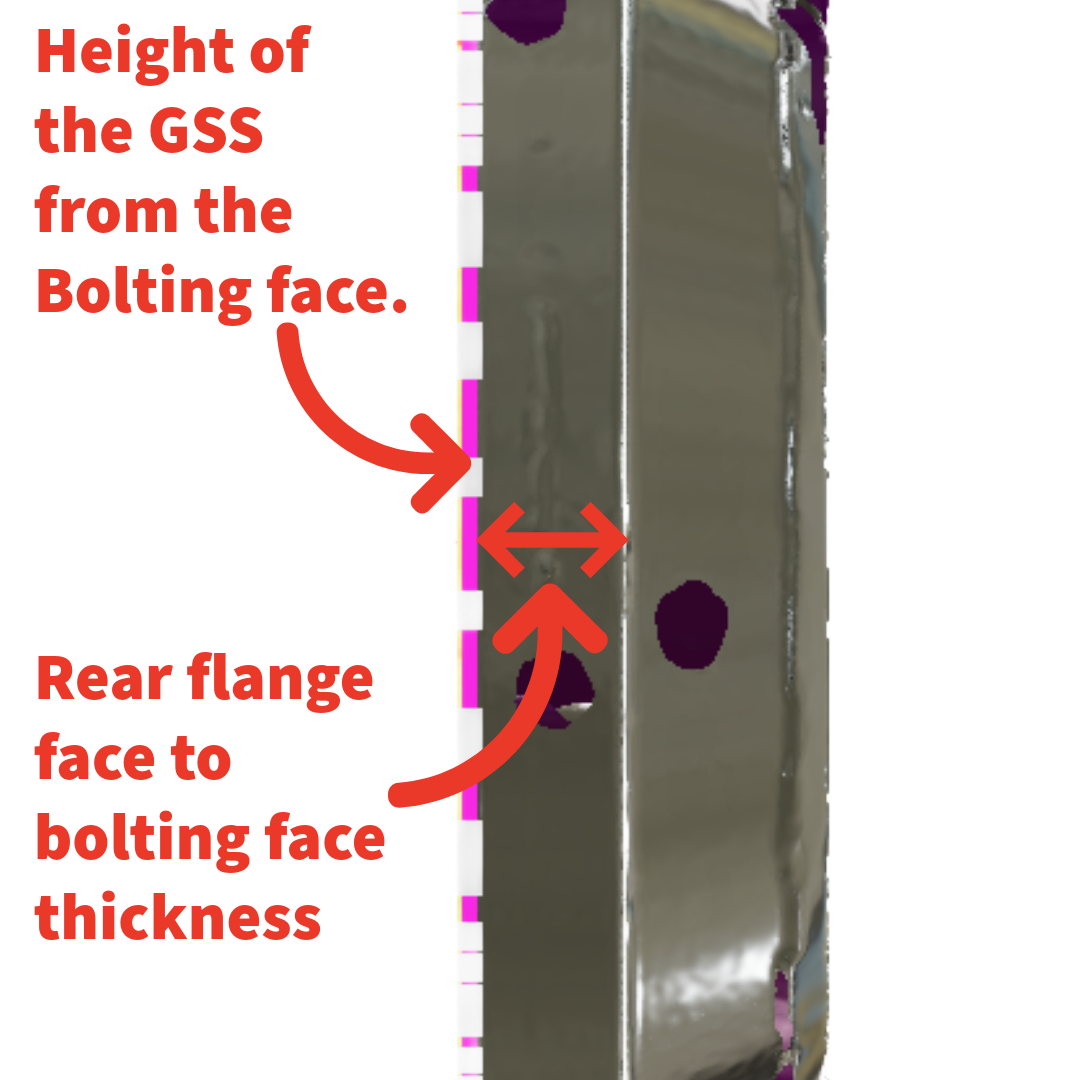
The Flange Thickness section provides additional dimensional information from the scan. It shows distances between the reference surfaces, or datums of the “Selections” created by the user. These typically include the Rear flange face to bolting face thickness, and height of the GSS from the Bolting face.

4. Pass/Fail Criteria Used
All of the results computed by FlangeVision are evaluated against built-in, or user-specified pass/fail criteria. PCC Hard Gasket, and PCC Soft Gasket Criteria are built into FlangeVision, and the user can enter and create their own custom criteria.
The Pass/Fail Criteria Used section, displays the selected criteria and the specific deviation tolerances required to achieve a pass condition.
This section also displays criteria for:
· Pass partition tolerance
· Surface defect allowable depth and radial width
· Surface finish maximum allowable roughness
The Surface Defects section details the allowable defect depth depending on how much of the sealing surface width is affected. In plain language, a defect becomes more problematic as it extends farther across the gasket sealing surface, which impacts the allowable depth of the defect.
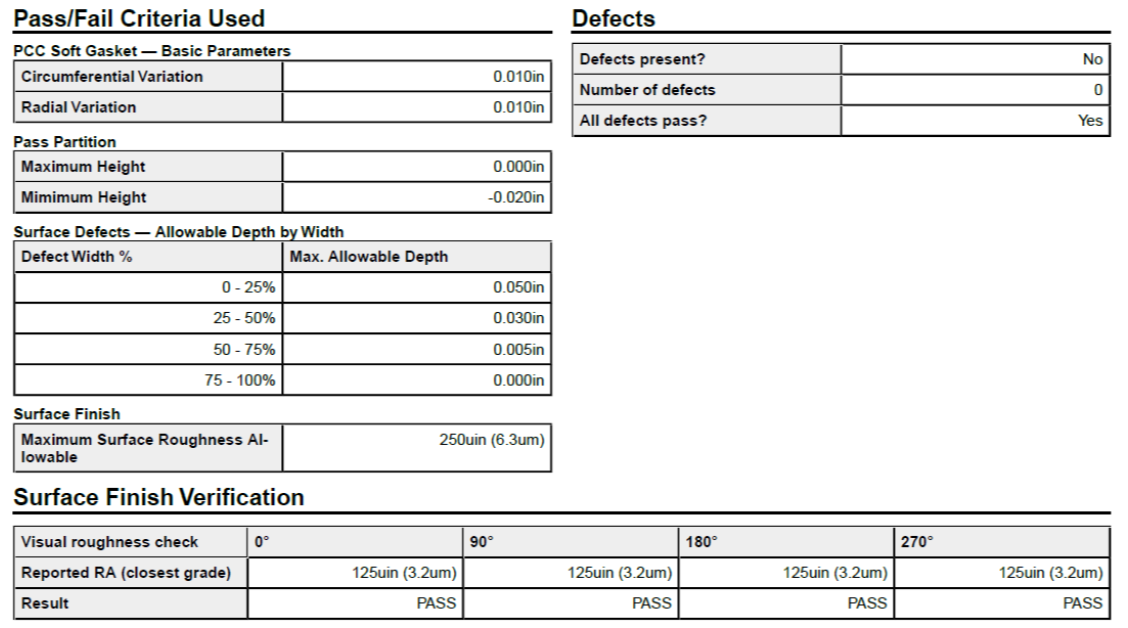
Using FlangeVison’s automatic defect detection feature, the Pass/Fail Criteria Used section also displays if defects were found on the GSS, the number of defects found, and if they all passed within the allowable depth and width.
5. Surface Finish Verification
The report also includes sections for visual surface finish verification. The Surface Finish Verification section provides positions at 0°, 90°, 180°, and 270° where roughness information can be documented from visual inspection.
6. The 3D Scan
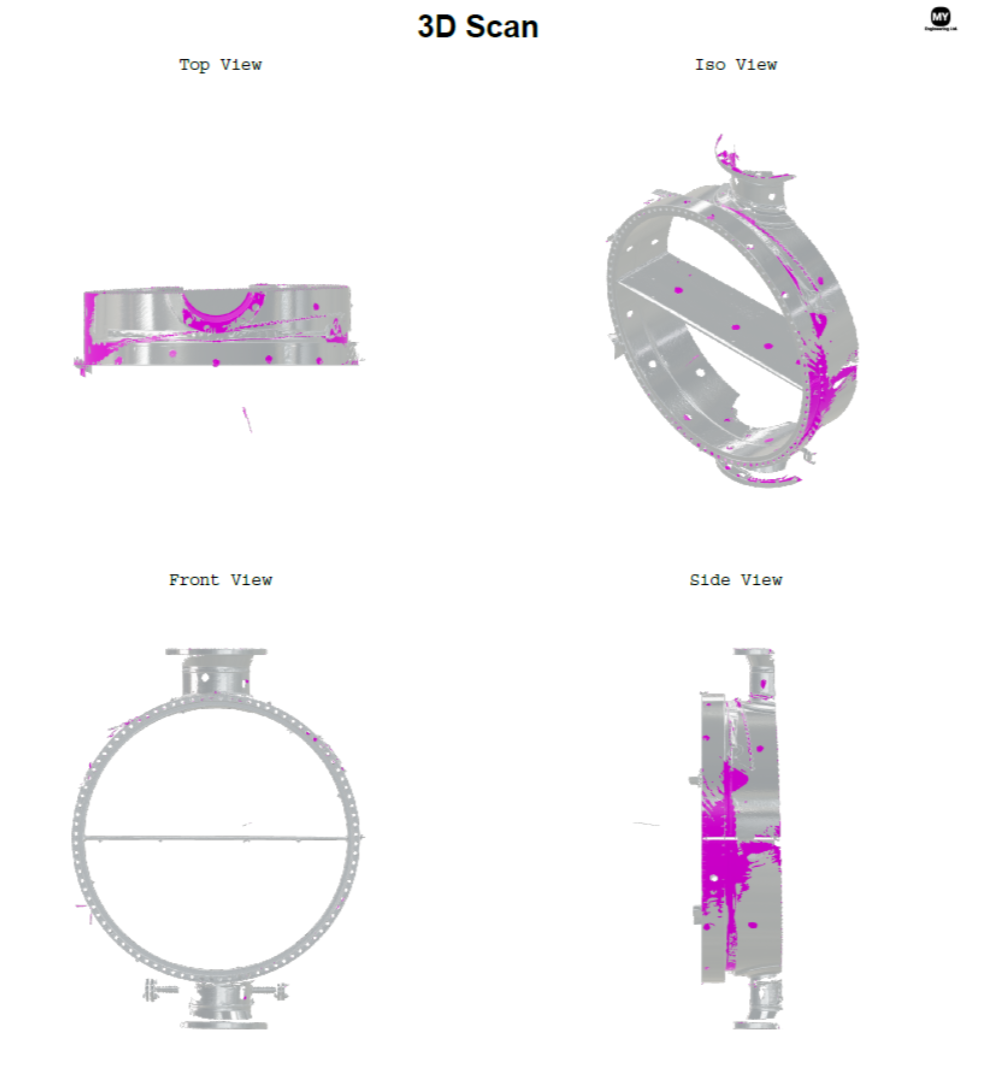
This section displays the actual 3D scan used for the analysis. The flange is shown from four different directions: Top View, Iso View, Front View, and Side View. This provides useful visual confirmation of the flange that was inspected and helps someone reviewing the report understand the scan coverage and recognize the flange geometry associated with the measurements.
For maintenance records, QA/QC documentation, or future comparison, this provides visual context that a table of measurements alone cannot provide.
7. GSS Circumferential Results — Measuring Around the Flange
The GSS Circumferential Results section provides an in-depth look at the circumferential measurements.
The easiest way to understand this page is to imagine three circular measurement paths running around the gasket sealing surface.
ID — the inner measurement ring
MD — the middle measurement ring
OD — the outer measurement ring
Each set of 3 measurements are taken at 32 angular positions around the flange by default, although the user can adjust the number of measurement points. The table begins at 0° (or 12 o’clock) and continues around the full circumference with the measurement points equally spaced.
FlangeVision measures the sealing surface along three circular paths: the inside (ID), middle (MD), and outside (OD) of the flange face. For each circle, the software creates a reference surface using the nearby 3D scan data. Think of this reference as a level starting point used to check how much the actual flange surface rises or falls as you move around the circle. FlangeVision takes measurements at regular points around each circle and compares them with the selected pass/fail limits.
To make the report values easier to visualize, the reference plane is set to the lowest measurement so the results are displayed as positive numbers, showing how much the surface varies from its reference plane. This is in alignment with PCC-1 criteria.
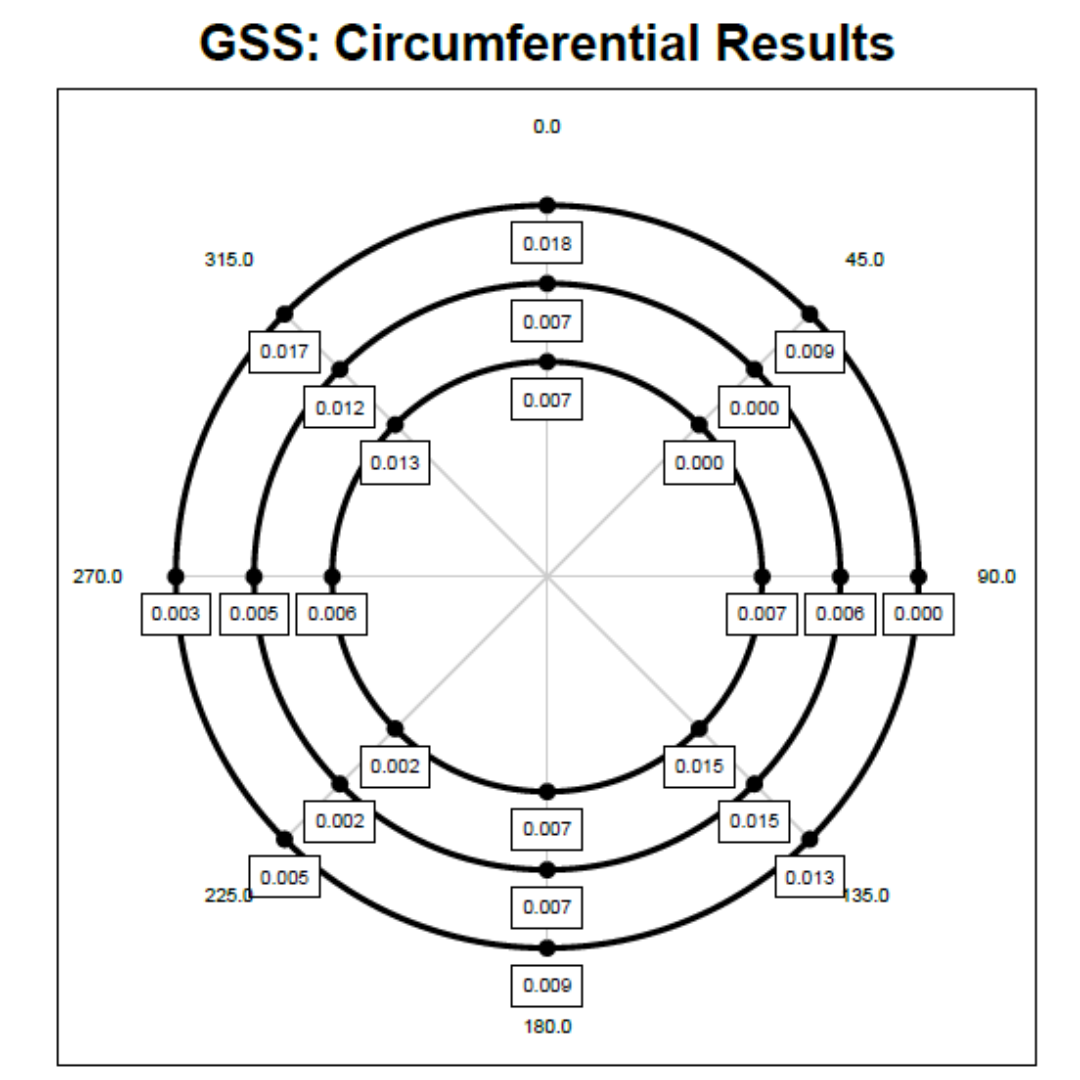
The circular chart displays 8 of the positions to make the measurements easy to visualize. These positions are also noted in the main result chart with a black dot left of the chart which displays the results of all 32 measurement positions.
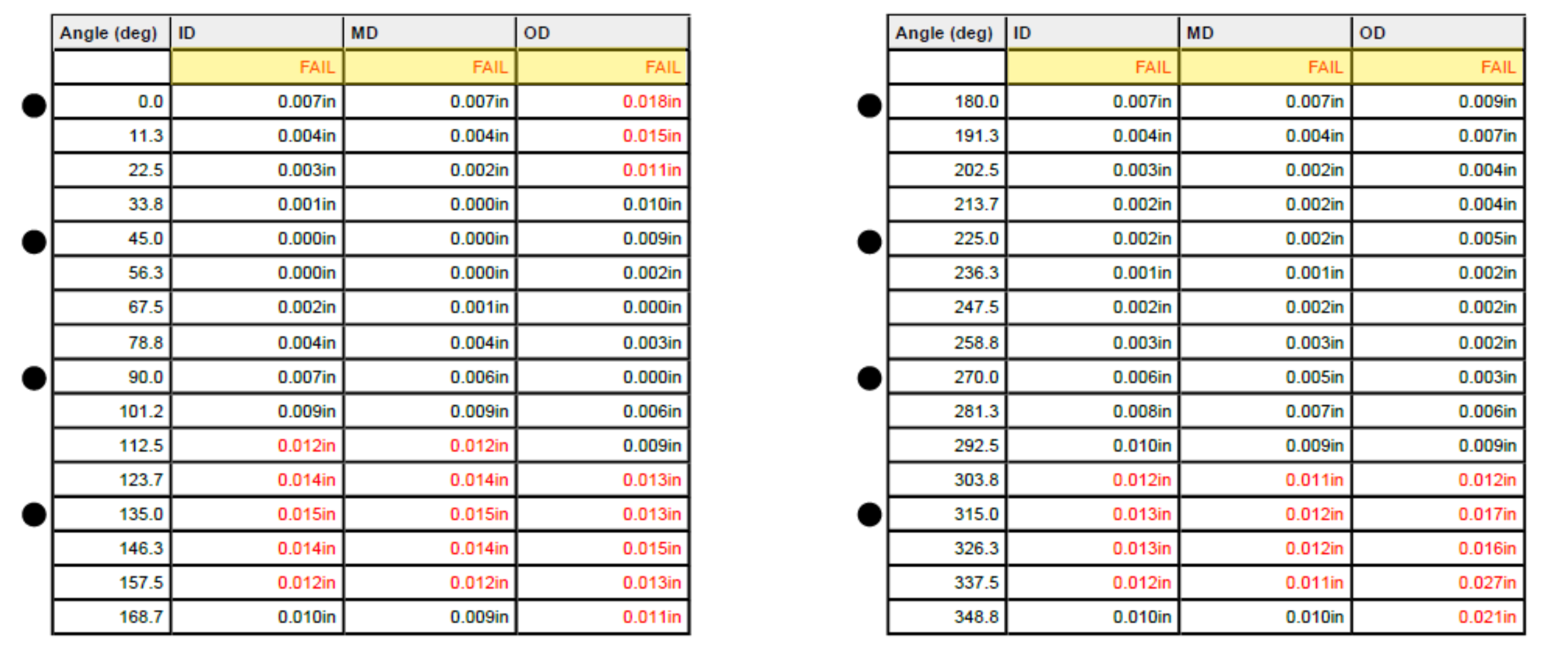
The report provides a PASS/ FAIL result for each listed circumferential ring (ID, MD, OD).
8. GSS Radial Results — Measuring Across the Flange
Imagine placing a straight edge across the gasket sealing surface, running from the inside toward the outside. That represents a radial measurement path. FlangeVision performs this type of check at same positions around the flange and reports the variation along each of these paths.
The radial measurements for each selection are also prepared using datum planes, but in this instance the datum is set to the lowest point measured radially at each measurement location.
All radial measurements are taken relative to this datum. FlangeVision then measures how the surface height changes as it moves outward across the sealing surface toward the outside edge (OD).
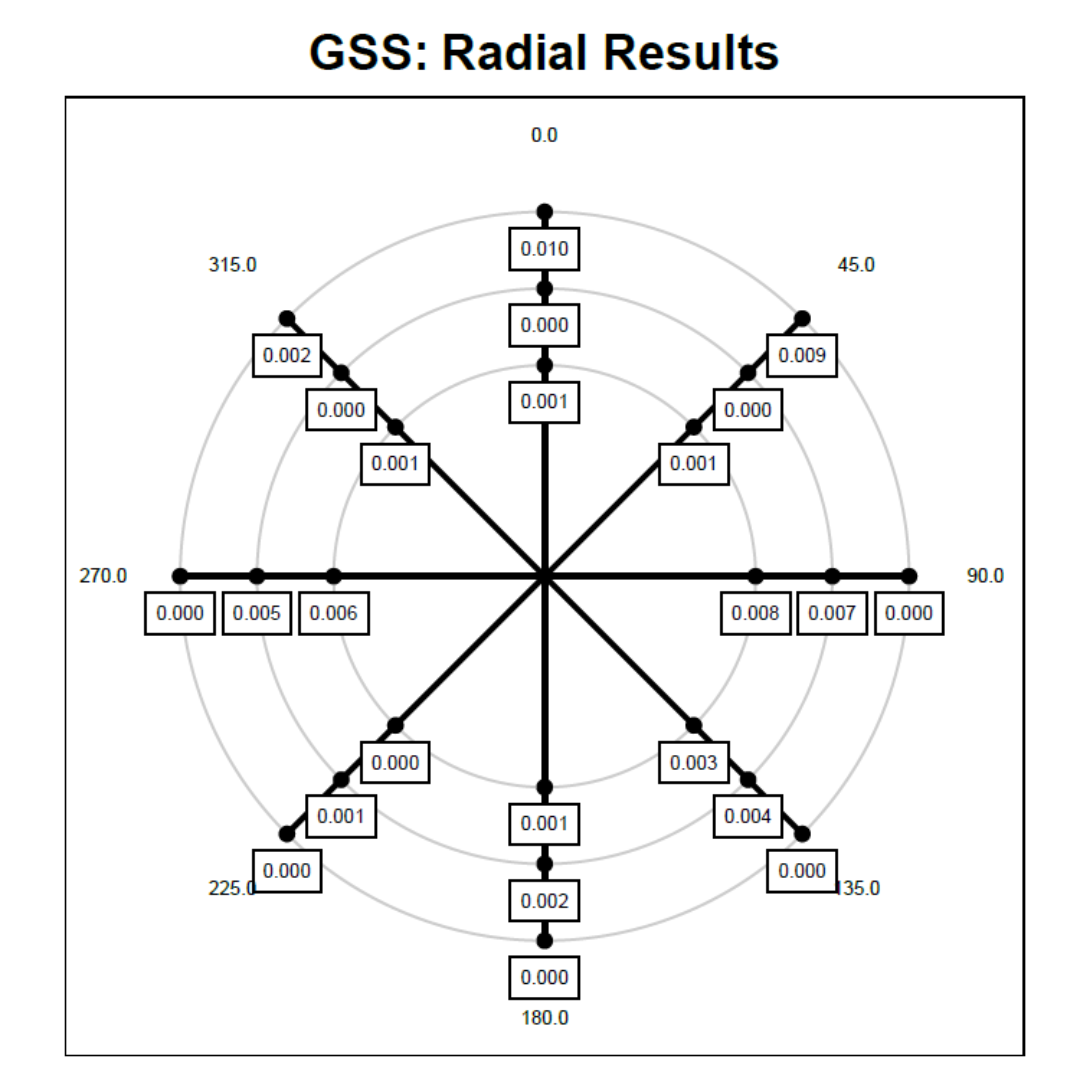
As with the Circumferential Results, the circular chart displays 8 of the positions to make the measurements easy to visualize. These positions are also noted in the main result chart with a black dot left of the chart.
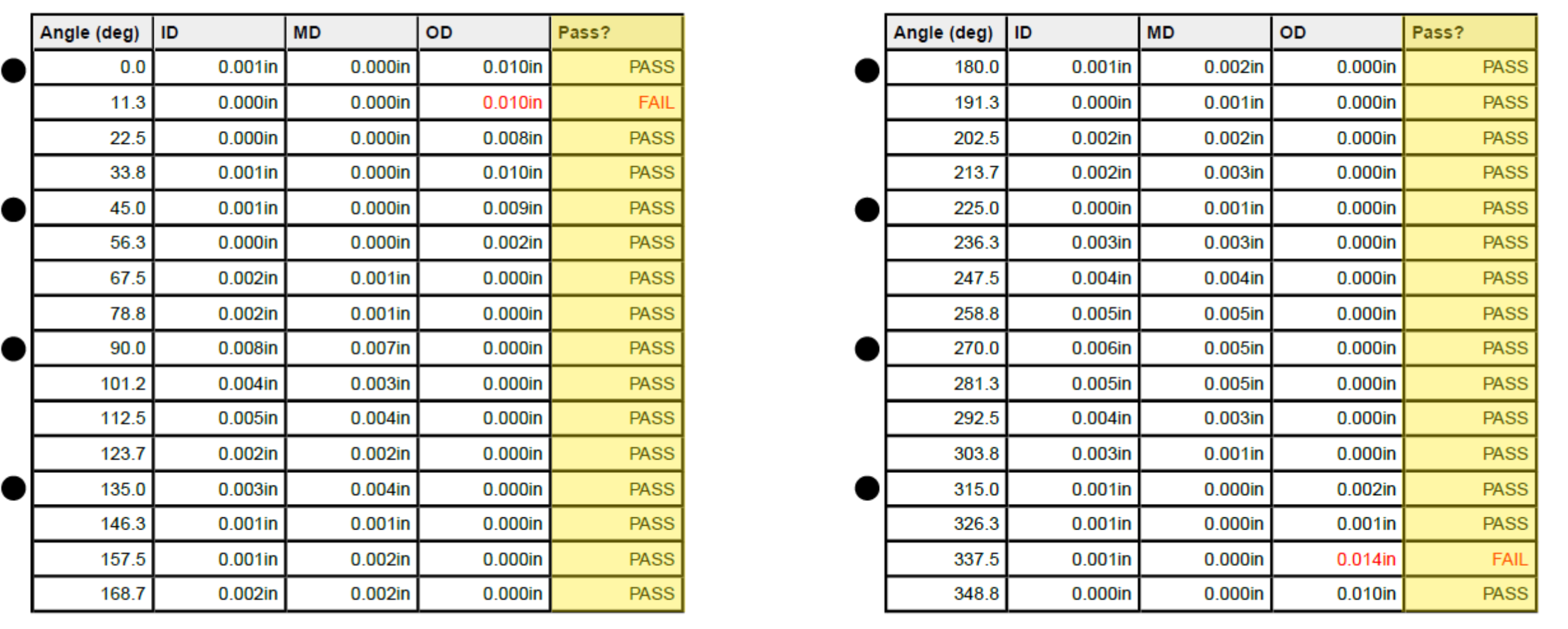
The report provides a PASS result for each listed radial locations.
9. Pass Partition
For each pass-partition line measurements are taken at regular intervals over the lines specified by the user. FlangeVision starts by working out the straight-line distance and dividing it into regular intervals; it then computes the displacement of the mesh from each interval, similar to the radial and circumferential flatness measurements and compares this value to the selected pass partition pass-fail criteria.
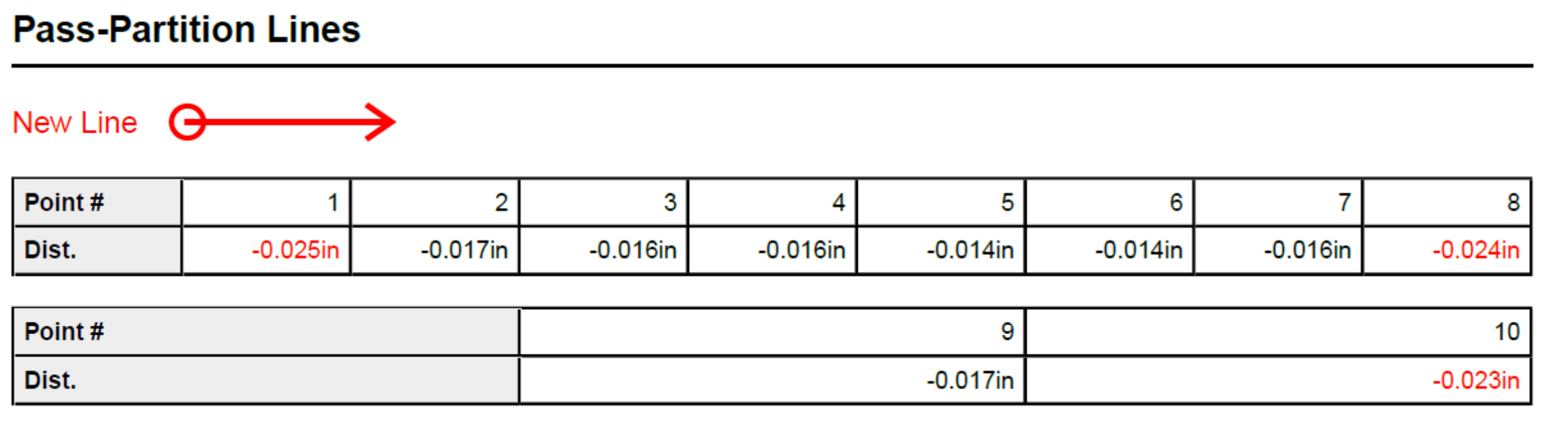
10. The Color Heightmap — Seeing Surface Variation
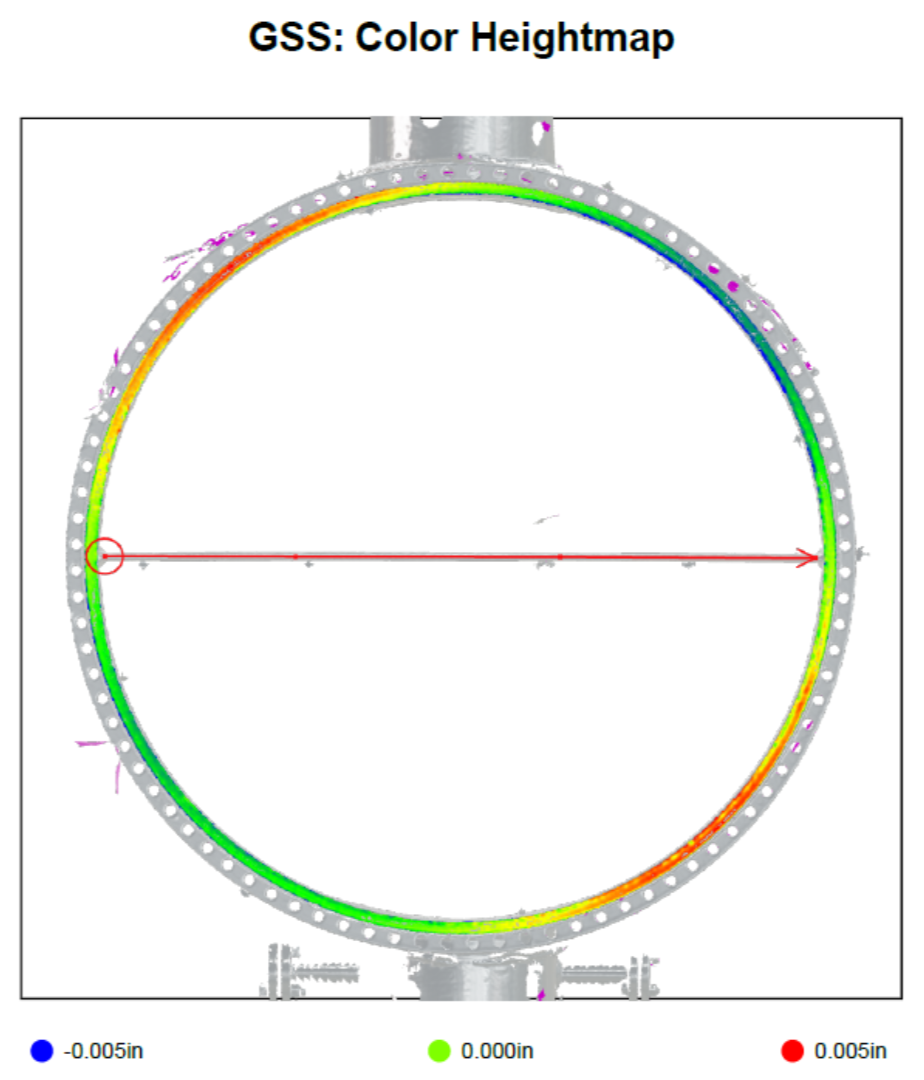
The final page turns measurement data into a visual map. The GSS Color Heightmap displays the scanned gasket sealing surface using colours that represent differences in surface height. The scale is based on the Pass/Fail Criteria used, and low (blue) and high (red) represent 50% of the total allowable variation. IE, if your total allowable variation is 0.15mm, your maximum high or low is 0.075mm.
The heightmap is especially useful for quickly seeing where surface variation is located, rather than trying to understand the flange from numbers alone.
It should not, however, be read simply as "green is good and red or blue is bad." The colours show relative height. The actual acceptance decision comes from comparing the calculated measurements with the inspection criteria used in the report.
If you would like to view the entire FlangeVision report reference in this article, click the link below: